What Makes a Phishing Email Work
Phishing emails succeed not because they're technically sophisticated, but because they're psychologically effective. They imitate familiar brands, exploit routine situations, and trigger an instinct to act quickly before thinking clearly. Understanding this manipulation is the first step to resisting it.
At its core, a phishing email is a deception tool - crafted to make you believe it comes from a trusted source so you'll hand over credentials, click a malicious link, or transfer money. The design has grown far more polished over time, with attackers copying real logos, formatting, and even email footer text from legitimate companies.
This type of attack is a form of social engineering - exploiting human trust rather than software vulnerabilities. Recognizing the anatomy of these emails is one of the most practical digital safety skills you can develop.
| Most common phishing target | Login credentials (usernames and passwords) (Anti-Phishing Working Group (APWG)) |
| Primary delivery method | Email (Verizon Data Breach Investigations Report) |
| Common impersonation targets | Financial institutions, tech companies, government agencies |
| Key psychological lever | Urgency and fear of consequences |
| Where to report phishing | ReportFraud.ftc.gov (U.S.) and reportphishing@apwg.org (Federal Trade Commission (FTC)) |
The Six Telltale Signs
Nearly every phishing email contains at least one of these structural red flags. Learning to spot them turns a convincing scam into an obvious one.
1. The Sender Address Doesn't Match the Brand
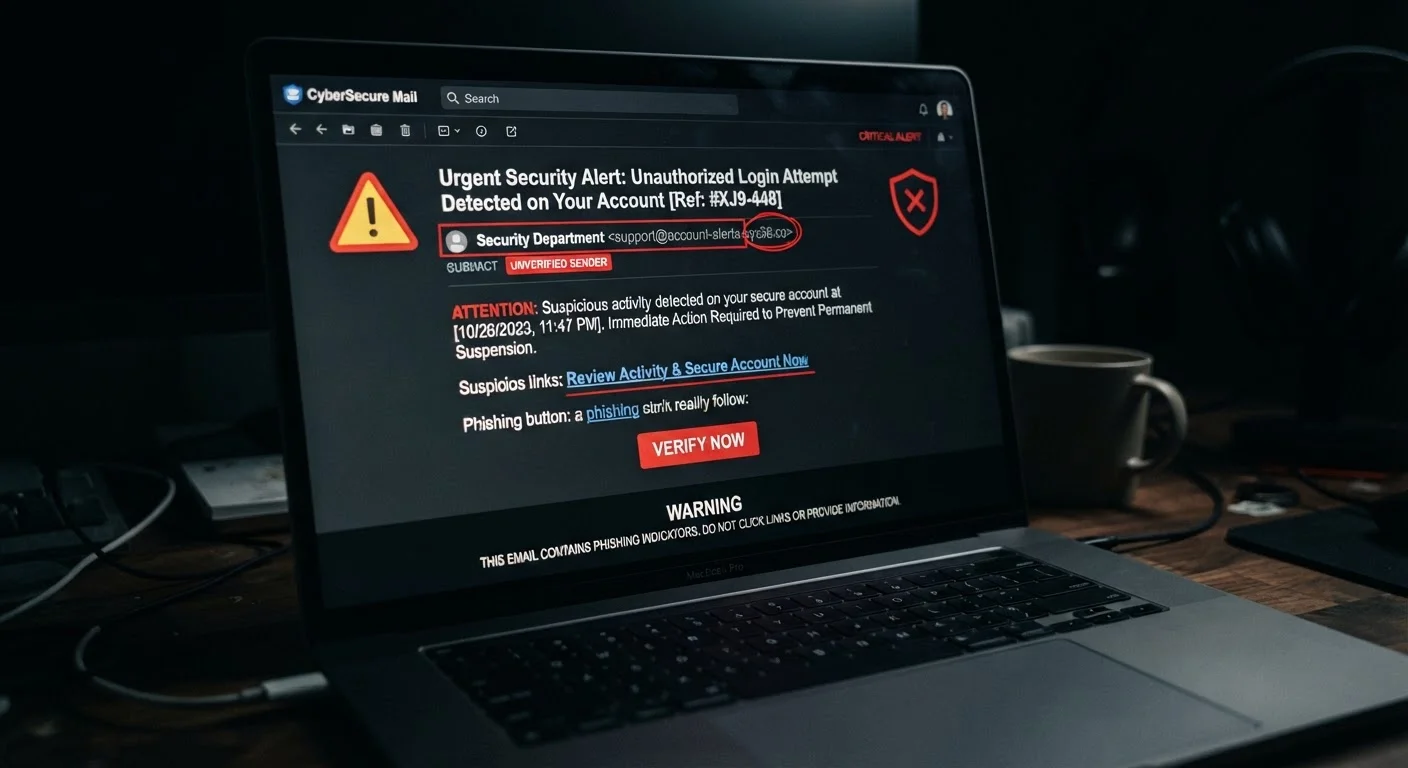
The display name might say "PayPal Security" but the actual email address - visible when you hover or tap the sender name - will often reveal something like noreply@paypa1-support.net. Look for subtle misspellings, extra words, or domains that don't match the company's official website.
2. Urgency and Threat Language
Phrases like "Your account will be suspended in 24 hours," "Immediate action required," or "Verify now to avoid penalties" are engineered to bypass careful thinking. Legitimate organizations rarely demand instant responses to security matters via a single email.
3. Generic Greetings
"Dear Customer" or "Hello User" instead of your actual name is a common tell. Companies that hold your account know who you are and typically address you by name in transactional emails.
4. Suspicious Links
Hover over any link before clicking - the actual URL displayed in your browser's status bar often differs from the link text. Attackers use redirect domains, URL shorteners, or lookalike addresses (e.g., secure-amazon-login.com) to mask destinations.
5. Unexpected Attachments
An invoice you didn't request, a shipping label for a package you didn't order, or a "document" from an unknown sender - unexpected attachments are a primary delivery mechanism for malware.
6. Requests for Sensitive Information
No legitimate bank, government agency, or tech company will ask you to confirm your Social Security number, password, or full credit card details via email. If an email asks for this, treat it as a scam regardless of how official it looks.
Phishing
A type of cyberattack where an attacker sends a fraudulent message - usually email - designed to trick the recipient into revealing sensitive information or installing malware. The term is a play on 'fishing,' with attackers casting wide nets hoping someone takes the bait.
Spoofing
Forging the apparent sender address or domain of an email to make it look like it came from a trusted source. Spoofing is a common technique used in phishing campaigns.
Lookalike Domain
A web address that closely mimics a legitimate domain - often by swapping letters, adding hyphens, or using a different top-level domain (e.g., .net instead of .com) - to deceive users into thinking they're on a real site.
Malware
Software designed to damage, disrupt, or gain unauthorized access to computer systems. Phishing emails commonly deliver malware through malicious attachments or links to infected websites.
Social Engineering
A manipulation technique that exploits human psychology - such as trust, authority, or urgency - rather than technical vulnerabilities. Phishing is one of the most common forms of social engineering.
What to Do When You Suspect a Phishing Email
Recognizing the warning signs matters - but knowing how to respond protects you just as much.
- Don't click any links or download attachments. Even previewing an attachment in some email clients can trigger scripts.
- Verify independently. If the email claims to be from your bank or a service you use, navigate directly to that company's website by typing the address into your browser - never by clicking the email link.
- Report it. Most email providers have a "Report phishing" option. You can also forward suspicious emails to the Anti-Phishing Working Group at reportphishing@apwg.org, or report to the FTC at ReportFraud.ftc.gov.
- Delete it. Once reported, remove the email from your inbox and trash folder.
If you've already clicked a link or entered credentials, change your passwords immediately and check for unauthorized account activity. Pairing strong password practices with phishing awareness is essential - see our article on password habits that quietly undermine your security for guidance on reducing your exposure.
It's also worth checking your assumptions about what makes you a target. Many people believe they're not worth a hacker's attention - a misconception examined in our piece on cybersecurity beliefs that simply aren't true.
Spear Phishing: A More Targeted Threat
Standard phishing casts a wide net, but 'spear phishing' targets specific individuals using personalized details - your name, employer, or recent activity - gathered from public sources or prior data breaches. These messages are harder to identify on appearance alone. If an email feels oddly specific about your situation yet still requests sensitive information or urgent action, apply the same scrutiny you would to any suspicious message.